ST-Gears
ST-Gears is a strong 3D reconstruction tool for Spatial Transcriptomics, with accurate position alignment plus distortion correction [Xia23].
ST-Gears consists of methods to compute anchors, to align rigidly and to registrate sections elastically:
st_gearsthe main method which computes mappings between adjacent sections in serial, using Fused-Gromov Wasserstein Optimal Transport with our innovatie Distributive Constraints.stack_slices_pairwise_rigidrigidly aligns sections using Procrustes Analysis.stack_slices_pairwise_elas_fieldeliminates distorsions through Gaussian Smoothed Elastic Fields. Validity is proved mathematically.
This function can be run on GPU, if you want to use GPU, you need to create an environment according to the guide Clustering_by_GPU.
Note
Torch is the necessary dependency for using GPU, we need to install it beforehand:
GPU(CUDA11): pip install torch==2.4.1+cu118 --extra-index-url https://download.pytorch.org/whl/

GPU(CUDA12): pip install torch==2.4.1+cu124 --extra-index-url https://download.pytorch.org/whl/
[1]:
import stereo as st
from stereo.core.ms_data import MSData
from natsort import natsorted
from glob import glob
Reading Data
Download our example data
[2]:
data_dir = '../data/mouse_brain/'
files_list = natsorted(glob(f'{data_dir}/*.h5ad'))
data_list = [st.io.read_h5ad(path) for path in files_list]
ms_data = MSData(_data_list=data_list)
ms_data
[2]:
ms_data: {'0': (805, 114), '1': (1051, 114), '2': (1188, 114), '3': (1206, 114), '4': (1448, 114), '5': (1487, 114), '6': (1584, 114), '7': (1652, 114), '8': (1748, 114), '9': (1766, 114), '10': (1649, 114), '11': (1667, 114), '12': (1783, 114), '13': (1730, 114), '14': (1810, 114), '15': (1812, 114), '16': (1680, 114), '17': (1692, 114), '18': (1586, 114), '19': (1634, 114), '20': (1604, 114), '21': (1531, 114), '22': (1527, 114), '23': (1676, 114), '24': (1399, 114), '25': (1388, 114), '26': (1221, 114), '27': (1149, 114), '28': (1163, 114), '29': (1172, 114), '30': (1023, 114), '31': (943, 114), '32': (847, 114), '33': (754, 114), '34': (751, 114), '35': (620, 114), '36': (629, 114), '37': (594, 114), '38': (509, 114), '39': (441, 114)}
num_slice: 40
names: ['0', '1', '2', '3', '4', '5', '6', '7', '8', '9', '10', '11', '12', '13', '14', '15', '16', '17', '18', '19', '20', '21', '22', '23', '24', '25', '26', '27', '28', '29', '30', '31', '32', '33', '34', '35', '36', '37', '38', '39']
obs: []
var: []
relationship: other
var_type: intersect to 0
mss: []
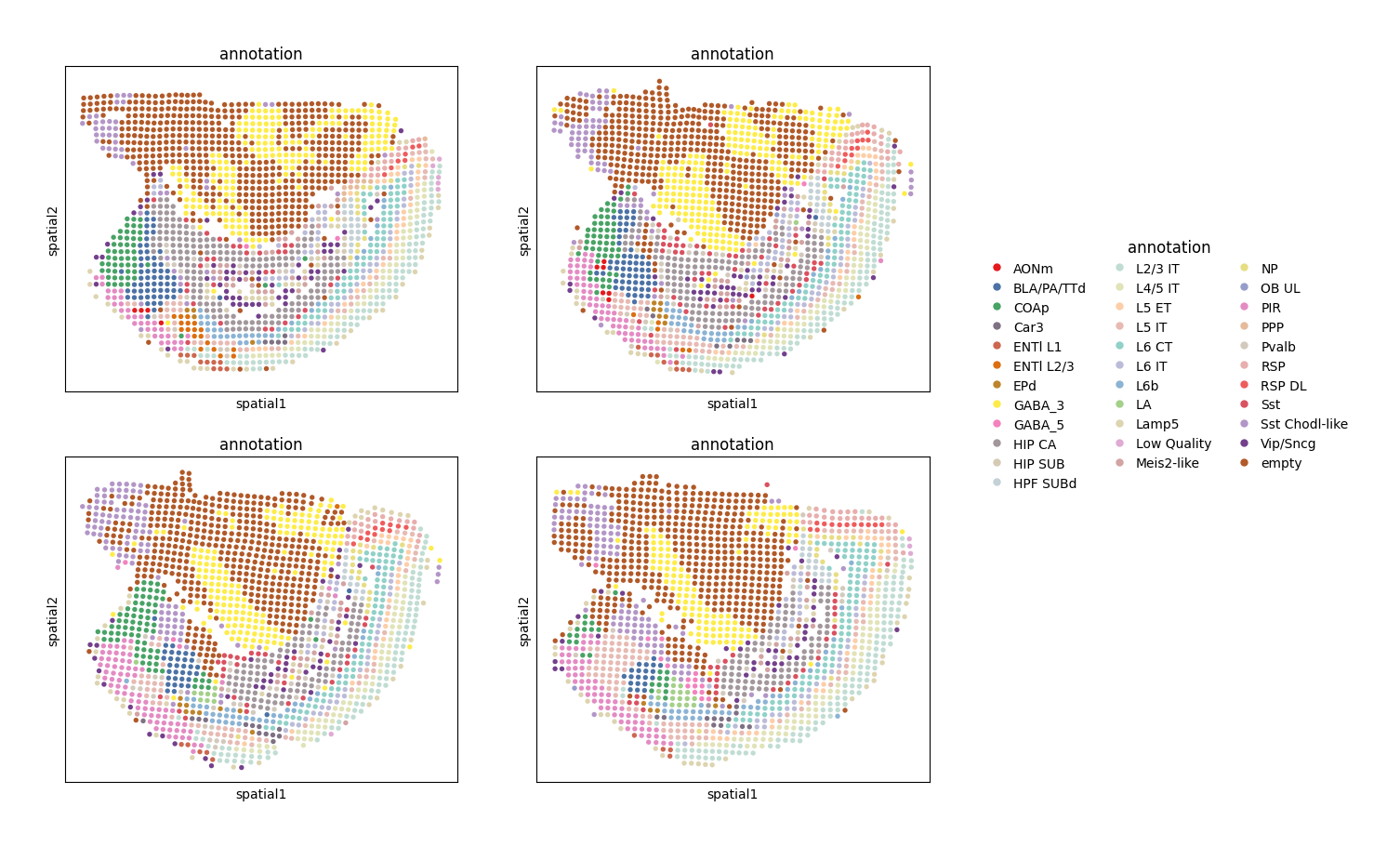
Showing the spatial distribution of cells type.
Here we take sample 8 to sample 11 as example.
We can see the last two samples are not aligned with the first two.
[3]:
ms_data[8:12].plt.ms_spatial_scatter(
    color_by='cluster',
    color_key='annotation',
    ncols=2
)
[3]:
Running ST-Gears
start_i and end_i specify computing scope of samples, here means to compute sample 8 to sample 11.
For more details refer to ms_data.tl.st_gears.
[4]:
st_gears_ins = ms_data.tl.st_gears(
    cluster_res_key='annotation',
    start_i=8,
    end_i=11,
    tune_alpha_li=[0.8, 0.4, 0.2, 0.1, 0.05, 0.025, 0.013, 0.006],
    numItermax=200,
    dissimilarity_val='kl',
    dissimilarity_weight_val='kl',
    uniform_weight=True,
    map_method_dis2wei='logistic',
    filter_by_label=True,
    use_gpu=False, # set to True to run on GPU
    verbose=False
)
2024-05-21 17:22:29.602807: W tensorflow/stream_executor/platform/default/dso_loader.cc:64] Could not load dynamic library 'libcudart.so.11.0'; dlerror: libcudart.so.11.0: cannot open shared object file: No such file or directory; LD_LIBRARY_PATH: /root/miniforge3/envs/stereopy/lib/python3.8/site-packages/cv2/../../lib64:
2024-05-21 17:22:29.602850: I tensorflow/stream_executor/cuda/cudart_stub.cc:29] Ignore above cudart dlerror if you do not have a GPU set up on your machine.
2024-05-21 17:22:30.396780: W tensorflow/stream_executor/platform/default/dso_loader.cc:64] Could not load dynamic library 'libcuda.so.1'; dlerror: libcuda.so.1: cannot open shared object file: No such file or directory; LD_LIBRARY_PATH: /root/miniforge3/envs/stereopy/lib/python3.8/site-packages/cv2/../../lib64:
2024-05-21 17:22:30.396820: W tensorflow/stream_executor/cuda/cuda_driver.cc:269] failed call to cuInit: UNKNOWN ERROR (303)
2024-05-21 17:22:30.396834: I tensorflow/stream_executor/cuda/cuda_diagnostics.cc:156] kernel driver does not appear to be running on this host (RCNSZOR29440A): /proc/driver/nvidia/version does not exist
2024-05-21 17:22:30.397043: I tensorflow/core/platform/cpu_feature_guard.cc:151] This TensorFlow binary is optimized with oneAPI Deep Neural Network Library (oneDNN) to use the following CPU instructions in performance-critical operations:  AVX2 FMA
To enable them in other operations, rebuild TensorFlow with the appropriate compiler flags.
/root/miniforge3/envs/stereopy/lib/python3.8/site-packages/ot/backend.py:2998: UserWarning: To use TensorflowBackend, you need to activate the tensorflow numpy API. You can activate it by running:
from tensorflow.python.ops.numpy_ops import np_config
np_config.enable_numpy_behavior()
  register_backend(TensorflowBackend())
[2024-05-21 17:22:31][Stereo][208994][MainThread][140512358360896][regis][308][INFO]: slice: 8, tune_alpha[0]: 0.8
[2024-05-21 17:23:06][Stereo][208994][MainThread][140512358360896][regis][320][INFO]: type score: 0.513073899588928
[2024-05-21 17:23:07][Stereo][208994][MainThread][140512358360896][regis][308][INFO]: slice: 8, tune_alpha[1]: 0.4
[2024-05-21 17:23:38][Stereo][208994][MainThread][140512358360896][regis][320][INFO]: type score: 0.5130738989987577
[2024-05-21 17:23:38][Stereo][208994][MainThread][140512358360896][regis][308][INFO]: slice: 8, tune_alpha[2]: 0.1
[2024-05-21 17:24:21][Stereo][208994][MainThread][140512358360896][regis][320][INFO]: type score: 0.5126084470579434
[2024-05-21 17:24:21][Stereo][208994][MainThread][140512358360896][regis][308][INFO]: slice: 8, tune_alpha[3]: 0.2
[2024-05-21 17:25:01][Stereo][208994][MainThread][140512358360896][regis][320][INFO]: type score: 0.5126084470579434
[2024-05-21 17:25:01][Stereo][208994][MainThread][140512358360896][regis][308][INFO]: slice: 8, tune_alpha[4]: 0.05
[2024-05-21 17:25:42][Stereo][208994][MainThread][140512358360896][regis][320][INFO]: type score: 0.5126084470579434
[2024-05-21 17:25:42][Stereo][208994][MainThread][140512358360896][regis][308][INFO]: slice: 8, tune_alpha[5]: 0.013
[2024-05-21 17:26:12][Stereo][208994][MainThread][140512358360896][regis][320][INFO]: type score: 0.5130738995805775
[2024-05-21 17:26:12][Stereo][208994][MainThread][140512358360896][regis][308][INFO]: slice: 8, tune_alpha[6]: 0.025
[2024-05-21 17:26:43][Stereo][208994][MainThread][140512358360896][regis][320][INFO]: type score: 0.513073899588928
[2024-05-21 17:26:43][Stereo][208994][MainThread][140512358360896][regis][308][INFO]: slice: 8, tune_alpha[7]: 0.006
[2024-05-21 17:27:07][Stereo][208994][MainThread][140512358360896][regis][320][INFO]: type score: 0.5130524923003253
[2024-05-21 17:27:07][Stereo][208994][MainThread][140512358360896][regis][381][INFO]: type_score_best: 0.513073899588928
[2024-05-21 17:27:07][Stereo][208994][MainThread][140512358360896][regis][386][INFO]: alpha_best: 0.8
[2024-05-21 17:27:07][Stereo][208994][MainThread][140512358360896][regis][308][INFO]: slice: 9, tune_alpha[0]: 0.8
[2024-05-21 17:28:31][Stereo][208994][MainThread][140512358360896][regis][320][INFO]: type score: 0.2414243316366492
[2024-05-21 17:28:31][Stereo][208994][MainThread][140512358360896][regis][308][INFO]: slice: 9, tune_alpha[1]: 0.4
[2024-05-21 17:28:54][Stereo][208994][MainThread][140512358360896][regis][320][INFO]: type score: 0.45907093574387764
[2024-05-21 17:28:54][Stereo][208994][MainThread][140512358360896][regis][308][INFO]: slice: 9, tune_alpha[2]: 0.1
[2024-05-21 17:29:16][Stereo][208994][MainThread][140512358360896][regis][320][INFO]: type score: 0.4593077244256847
[2024-05-21 17:29:16][Stereo][208994][MainThread][140512358360896][regis][308][INFO]: slice: 9, tune_alpha[3]: 0.2
[2024-05-21 17:29:32][Stereo][208994][MainThread][140512358360896][regis][320][INFO]: type score: 0.45907093574387764
[2024-05-21 17:29:32][Stereo][208994][MainThread][140512358360896][regis][308][INFO]: slice: 9, tune_alpha[4]: 0.05
[2024-05-21 17:30:00][Stereo][208994][MainThread][140512358360896][regis][320][INFO]: type score: 0.4593077244332003
[2024-05-21 17:30:00][Stereo][208994][MainThread][140512358360896][regis][308][INFO]: slice: 9, tune_alpha[5]: 0.013
[2024-05-21 17:30:32][Stereo][208994][MainThread][140512358360896][regis][320][INFO]: type score: 0.45930772443320084
[2024-05-21 17:30:32][Stereo][208994][MainThread][140512358360896][regis][308][INFO]: slice: 9, tune_alpha[6]: 0.025
[2024-05-21 17:31:08][Stereo][208994][MainThread][140512358360896][regis][320][INFO]: type score: 0.45930772443320084
[2024-05-21 17:31:08][Stereo][208994][MainThread][140512358360896][regis][308][INFO]: slice: 9, tune_alpha[7]: 0.006
[2024-05-21 17:31:36][Stereo][208994][MainThread][140512358360896][regis][320][INFO]: type score: 0.45930772443233686
[2024-05-21 17:31:37][Stereo][208994][MainThread][140512358360896][regis][381][INFO]: type_score_best: 0.45930772443320084
[2024-05-21 17:31:37][Stereo][208994][MainThread][140512358360896][regis][386][INFO]: alpha_best: 0.013
[2024-05-21 17:31:37][Stereo][208994][MainThread][140512358360896][regis][308][INFO]: slice: 10, tune_alpha[0]: 0.8
[2024-05-21 17:32:17][Stereo][208994][MainThread][140512358360896][regis][320][INFO]: type score: 0.5053710730365645
[2024-05-21 17:32:18][Stereo][208994][MainThread][140512358360896][regis][308][INFO]: slice: 10, tune_alpha[1]: 0.4
[2024-05-21 17:32:52][Stereo][208994][MainThread][140512358360896][regis][320][INFO]: type score: 0.5053710730365645
[2024-05-21 17:32:52][Stereo][208994][MainThread][140512358360896][regis][308][INFO]: slice: 10, tune_alpha[2]: 0.1
[2024-05-21 17:33:11][Stereo][208994][MainThread][140512358360896][regis][320][INFO]: type score: 0.5135360723816852
[2024-05-21 17:33:12][Stereo][208994][MainThread][140512358360896][regis][308][INFO]: slice: 10, tune_alpha[3]: 0.2
[2024-05-21 17:33:38][Stereo][208994][MainThread][140512358360896][regis][320][INFO]: type score: 0.5053710730365645
[2024-05-21 17:33:38][Stereo][208994][MainThread][140512358360896][regis][308][INFO]: slice: 10, tune_alpha[4]: 0.05
[2024-05-21 17:33:59][Stereo][208994][MainThread][140512358360896][regis][320][INFO]: type score: 0.5135360723818474
[2024-05-21 17:33:59][Stereo][208994][MainThread][140512358360896][regis][308][INFO]: slice: 10, tune_alpha[5]: 0.013
[2024-05-21 17:34:23][Stereo][208994][MainThread][140512358360896][regis][320][INFO]: type score: 0.5135360723816823
[2024-05-21 17:34:23][Stereo][208994][MainThread][140512358360896][regis][308][INFO]: slice: 10, tune_alpha[6]: 0.025
[2024-05-21 17:34:49][Stereo][208994][MainThread][140512358360896][regis][320][INFO]: type score: 0.5135360723816794
[2024-05-21 17:34:49][Stereo][208994][MainThread][140512358360896][regis][308][INFO]: slice: 10, tune_alpha[7]: 0.006
[2024-05-21 17:35:07][Stereo][208994][MainThread][140512358360896][regis][320][INFO]: type score: 0.5135279752455112
[2024-05-21 17:35:07][Stereo][208994][MainThread][140512358360896][regis][381][INFO]: type_score_best: 0.5135360723818474
[2024-05-21 17:35:07][Stereo][208994][MainThread][140512358360896][regis][386][INFO]: alpha_best: 0.05
Rigidly aligning sections using Procrustes Analysis.
Setting set_as_position as True to use the rigidly aligned coordinates as the cells/bins position.
For more details refer to st_gears_ins.stack_slices_pairwise_rigid.
[5]:
st_gears_ins.stack_slices_pairwise_rigid(set_as_position=True)
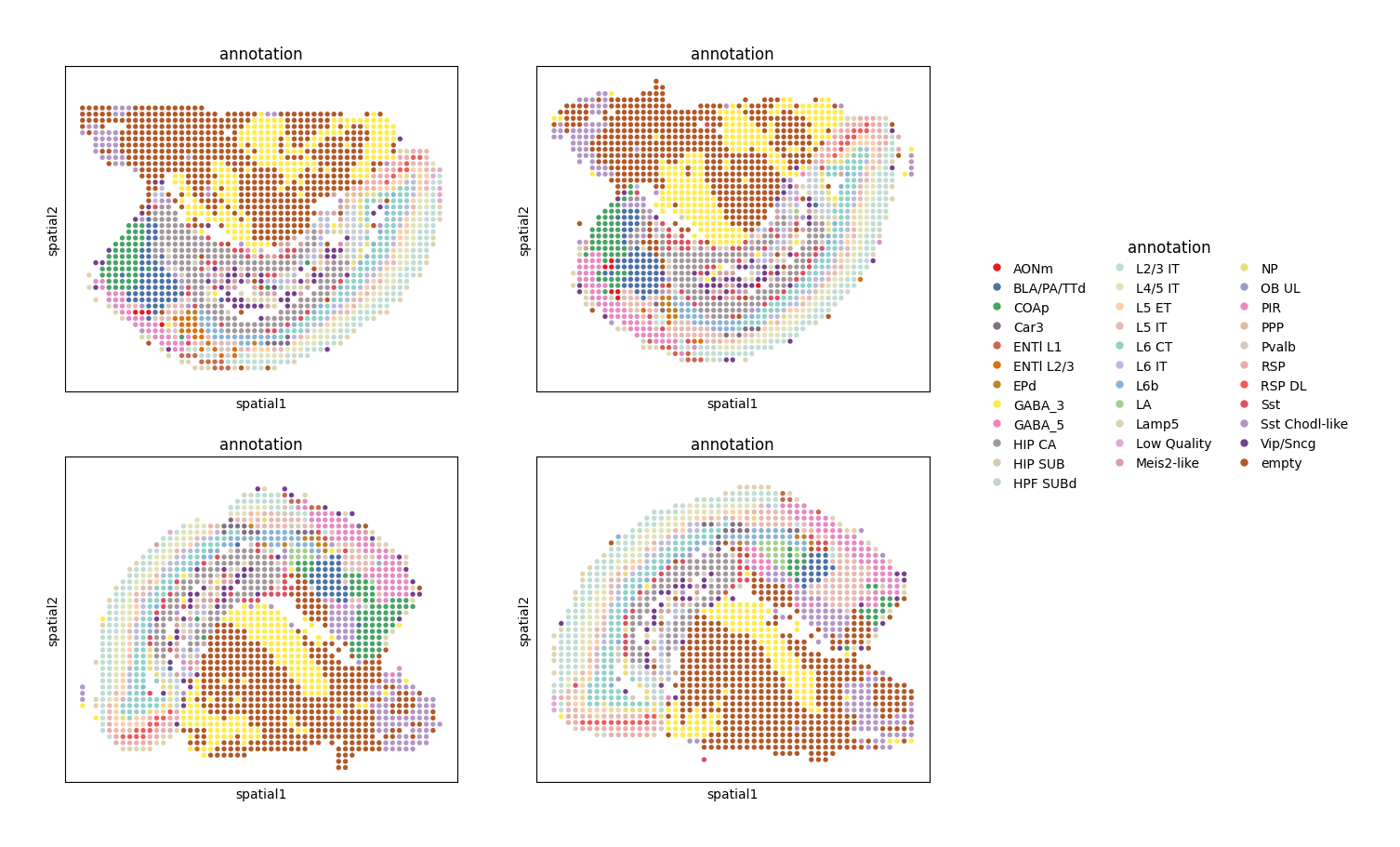
Showing the spatial distribution of cells type after aligning.
We can see the last two samples have been aligned with the first two.
[6]:
ms_data[8:12].plt.ms_spatial_scatter(
    color_by='cluster',
    color_key='annotation',
    ncols=2
)
[6]:
Eliminating distorsions through Gaussian Smoothed Elastic Fields
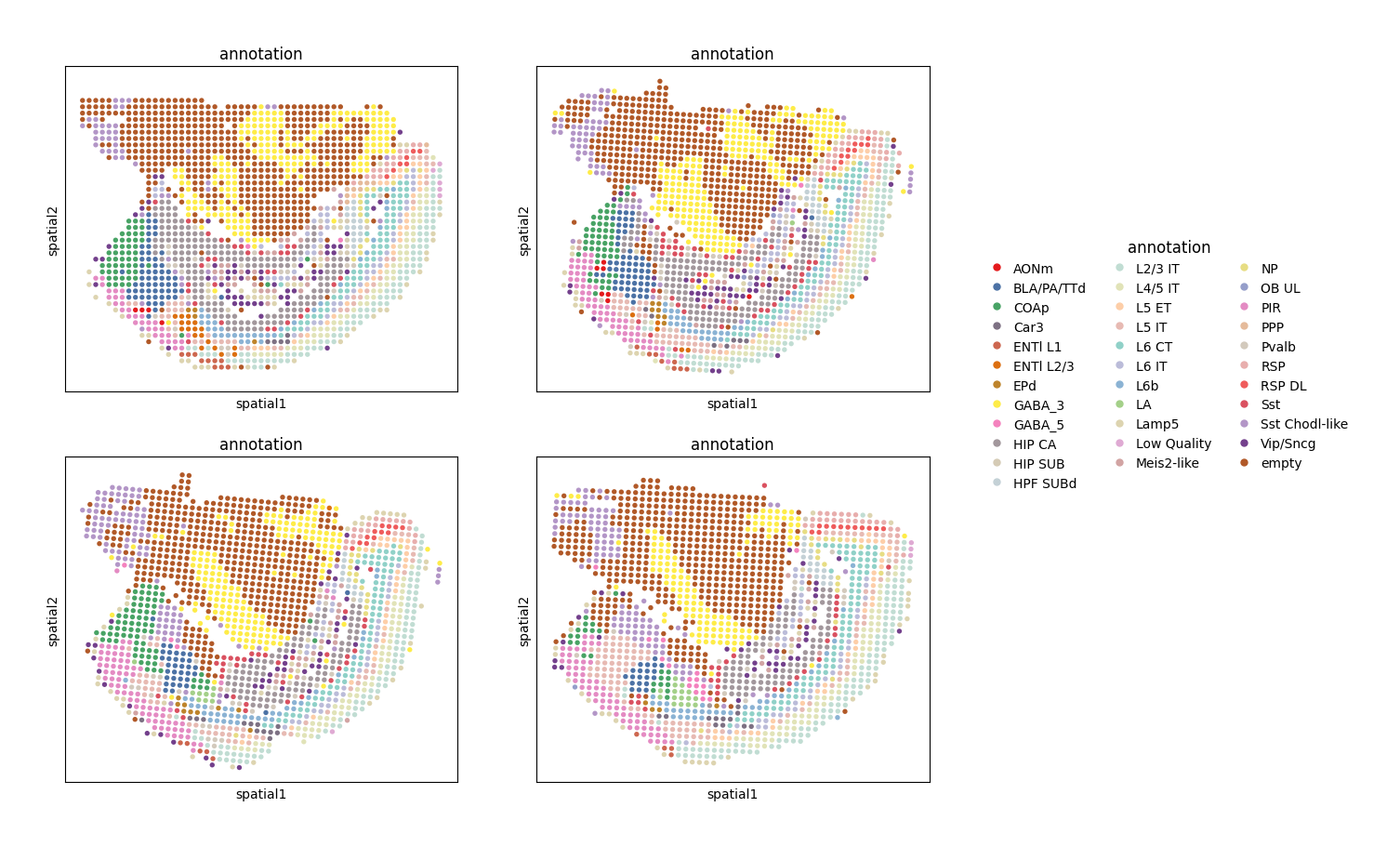
This method attempts to restore the shape of tissues.
Setting set_as_position as True to use the coordinates eliminated distorsions as the cells/bins position.
For more details refer to st_gears_ins.stack_slices_pairwise_elas_field.
This method can not be ran without running method stack_slices_pairwise_rigid.
[7]:
st_gears_ins.stack_slices_pairwise_elas_field(pixel_size=200, set_as_position=True)
Showing the spatial distribution of cells type after eliminating distorsions.
[8]:
ms_data[8:12].plt.ms_spatial_scatter(
    color_by='cluster',
    color_key='annotation',
    ncols=2
)
[8]: